Productivity Reports for Your Weekly Plan
Published: November 16, 2026
💡 How can I see where my time actually goes each week?
Open Reports in Week Plan and pick a range such as last week or the last 12 weeks. You see completed tasks, estimated and tracked hours, a breakdown by role and by quadrant, your Quadrant 2 trend over time, and the tasks that keep getting moved.
You finish most weeks tired, and you know you were busy. But busy with what? Did the project that matters most get any real time, or did it lose again to email and small fires? Without a look back, every week blurs into the next and it is hard to change anything.
Reports in Week Plan answer that question with your own data. Because your tasks already carry roles, quadrants, time estimates and tracked time, Week Plan can show you where your effort went, which priorities got attention, and which tasks you keep pushing to "later".
How Reports work in Week Plan
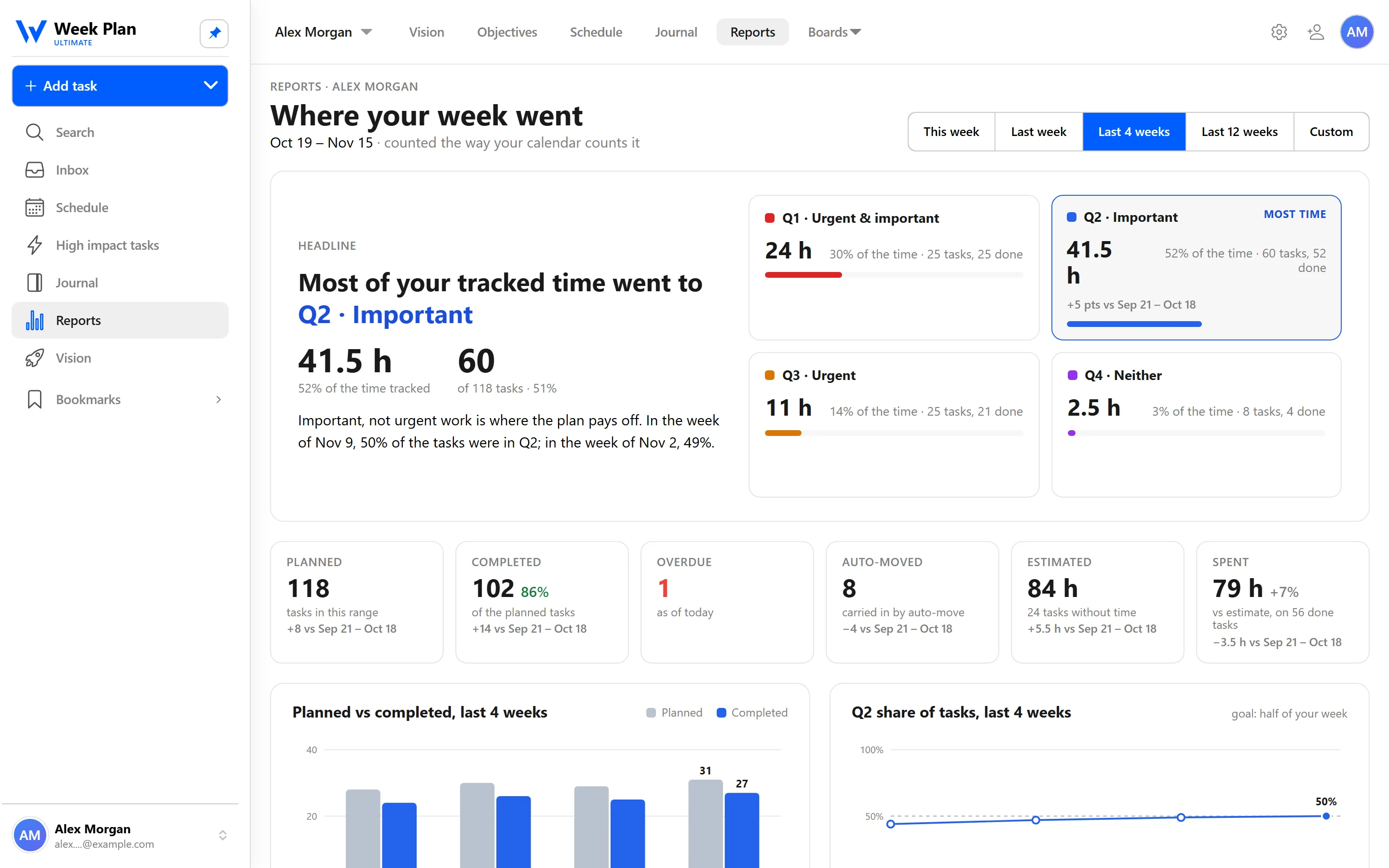
Open Reports and choose a range: last week, the last 4 weeks, the last 12 weeks, or a custom range. Everything on the page follows that range.
The totals. You see how many tasks you completed, plus your estimated hours and your tracked hours. Comparing the two is a quiet lesson in planning: if you estimate 20 hours and track 32, your weeks are probably overbooked before they start.
By role. Tasks are broken down by the roles you plan with, such as Product Lead, Parent or Health & Fitness. This is where balance becomes visible. If one role took nearly all your time for a month, the chart shows it plainly.
By quadrant. Every task you marked as important or urgent lands in one of the four quadrants of the Eisenhower Matrix. The Quadrant hero tells you which quadrant held most of your tasks and time in the selected range.
The Quadrant 2 trend. A chart tracks, week over week, how much of your work sits in Quadrant 2: important, not urgent. This is the most useful line for anyone trying to plan proactively, because it shows whether your habits are actually changing.
Keeps getting moved. Week Plan lists tasks that keep being rescheduled, including the ones that rolled over automatically to the next day. Overdue tasks get their own list too. Both are honest signals: a task moved five times is either not important, too big, or something you are avoiding.
By team member. In a team workspace, the same report can be broken down per person, which makes workload conversations concrete instead of a matter of impressions.
The 7 Habits behind it
Week Plan is built on Stephen Covey's The 7 Habits of Highly Effective People, and Reports connect two of the habits.
Habit 3: Put First Things First. Covey's central idea is that effective people spend more time in Quadrant 2, on what is important before it becomes urgent. Most of us believe we do this. The Quadrant 2 trend shows whether we really do, and the role breakdown shows whether the important areas of life get their share, not only work.
Habit 7: Sharpen the Saw. Renewal includes stepping back to learn from how you worked. A report is a mirror for that reflection. Looking at it during your weekly review turns "I should plan better" into a specific change, like protecting two mornings for a Quadrant 2 project.
How to get started
- Mark tasks as important and/or urgent as you plan, so they fall into the right quadrant. The Quadrant view makes this quick.
- Give tasks a role, and add time estimates where it helps. Track time on the tasks you want to measure.
- After a week or two, open Reports and start with last week.
- Switch to the last 4 or 12 weeks to see your Quadrant 2 trend and your balance across roles.
- Pick one task from "Keeps getting moved" and decide: break it down, schedule it properly, or delete it.
Tips
- Read reports during your weekly review. Five minutes with the numbers before you plan the next week is enough to spot a pattern.
- Look for a trend, not a perfect week. One heavy Quadrant 1 week is normal. Three in a row is a signal to rethink commitments.
- Use estimates honestly. The gap between estimated and tracked hours only helps if the estimates are your real guesses.
- Treat moved tasks without guilt. A postponed task is information. Often the fix is splitting it into a first small step.