Plan Your Week by Life Roles for Balance
Published: November 16, 2026
💡 What does it mean to plan your week by roles?
Instead of one long task list, you look at each role you play, such as professional, parent or health, and choose one or two High Impact Tasks for each. In Week Plan, every role has its own envisioned future and its own tasks, so no part of your life quietly drops off the plan.
When work is busy, it takes over. The gym gets skipped, the call to your parents waits another week, and the book you wanted to read stays on the nightstand. None of that is a decision; it just happens because work is the loudest thing on your list. Week Plan lets you plan your week by the roles you play, so every part of your life gets a deliberate place in the week, not just whatever is left over.
How roles work in Week Plan
A role is an area of your life you care about and are responsible for: your job, being a parent, your health, your personal growth. You set up your roles once and then use them every week.
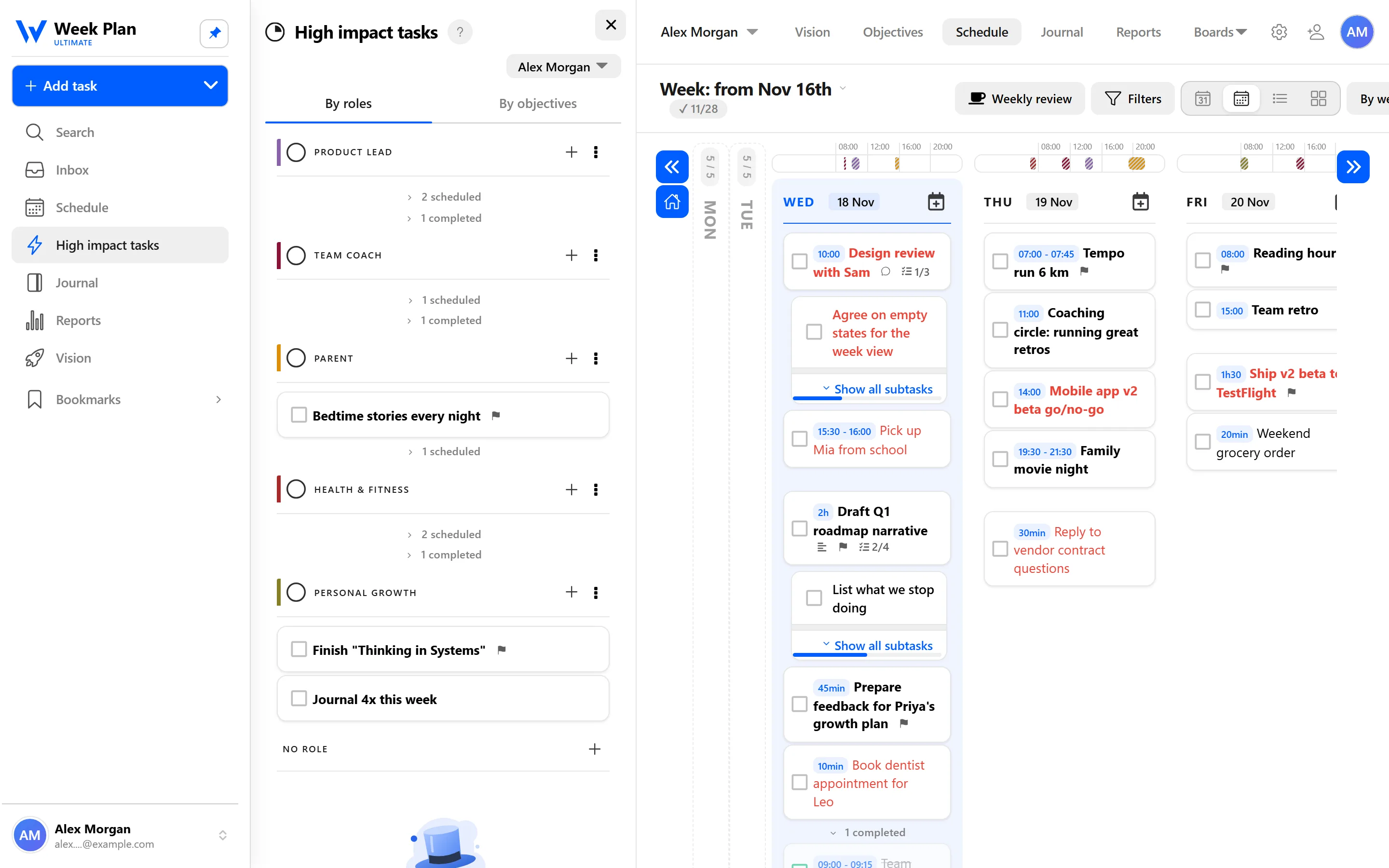
- High Impact Tasks per role. Each week you choose a few High Impact Tasks for each role, the tasks that would make the biggest difference there. The High Impact Tasks sidebar groups them by role, with progress, and you drag them onto days.
- Roles colour your tasks. Every task can belong to a role, and the role's colour shows in your week. A glance tells you whether Thursday is all work or has room for anything else.
- An envisioned future for each role. In Vision, you can describe what success looks like in each role. That description is what you come back to when you choose the role's High Impact Tasks.
- Objectives per role. If a role has a bigger goal this quarter, you can give it Objectives with key results.
In the sample week on this page, Alex has five roles: Product Lead, Team Coach, Parent, Health & Fitness and Personal Growth. Two are about work; three are not, and they get planned just the same.
A vision for each role
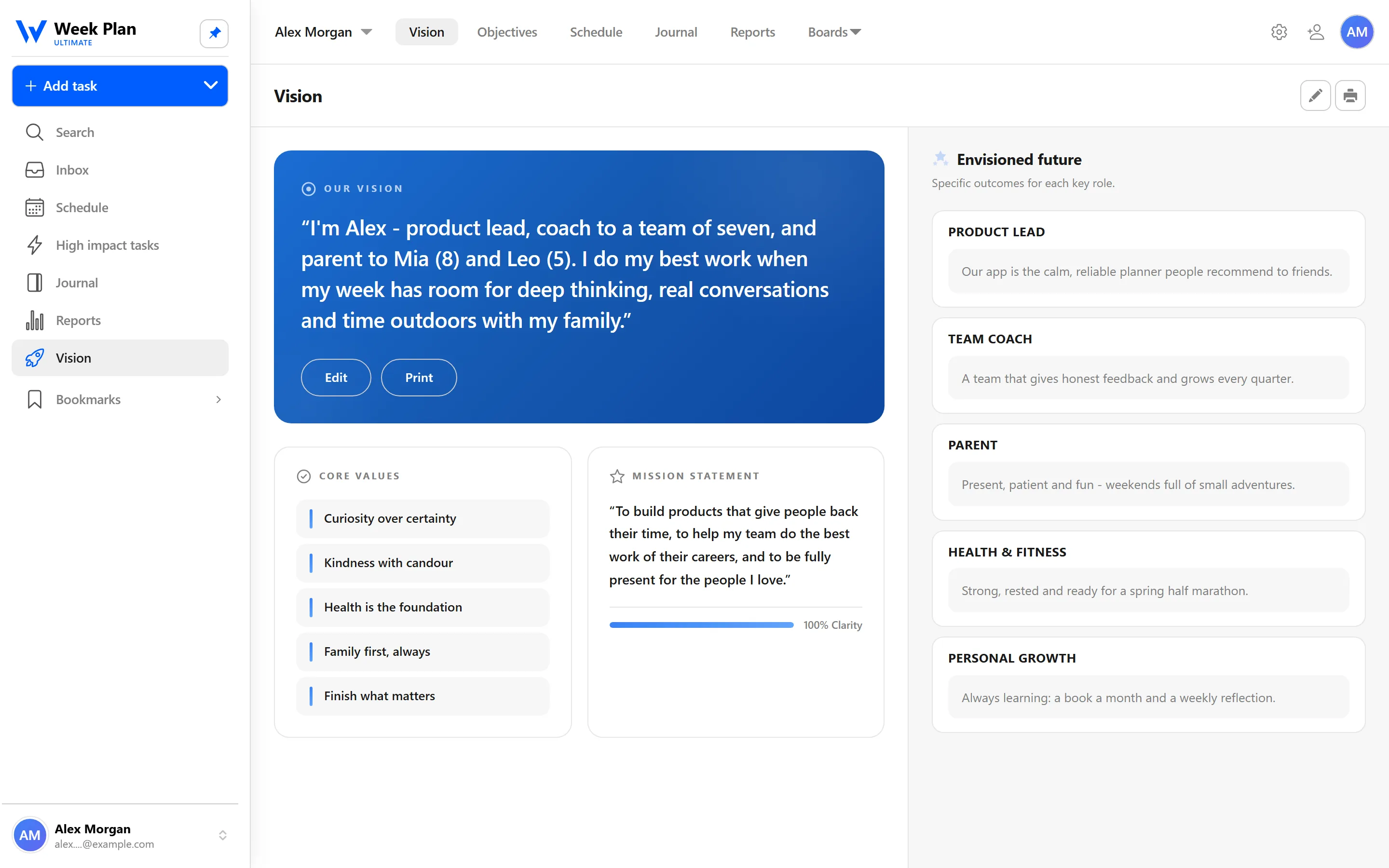
The envisioned future you write in Vision is the long view of a role. The weekly High Impact Tasks are the short view. Keeping both in one app is what makes the connection hold.
The 7 Habits behind it
Week Plan is built on Stephen Covey's The 7 Habits of Highly Effective People. Roles sit where two habits meet.
Habit 2: Begin with the End in Mind. Covey suggested writing a personal mission and then looking at your life through your roles, asking what you want to contribute in each one. The envisioned future for each role in Week Plan is that idea in practice.
Habit 3: Put First Things First. Covey's weekly planning process starts by listing your roles and setting a goal or two for each before anything goes on the calendar. That is exactly how High Impact Tasks per role work: you choose what matters in each role first, then schedule it.
The result is balance, not because every role gets equal time, but because none of them is forgotten. The academy goes further in how to live a balanced life and writing an envisioned future.
How to get started
- List your roles. Start with the obvious ones: your job, family, health. Add personal growth or community if they matter to you.
- Write an envisioned future for each role in Vision. A few sentences is enough to begin.
- Plan your week role by role. Add one or two High Impact Tasks for each role in the High Impact Tasks sidebar.
- Drag them onto days, and give the rest of your tasks a role so they pick up its colour.
- Check the sidebar during the week to see which roles are on track.
Tips
- Split a big role. If your job has two very different sides, such as product and people management, make them two roles.
- A small task counts. For some roles, one High Impact Task like "bike ride with the kids on Saturday" is the whole plan, and that is fine.
- Look at the colours. If your week is almost one colour, that is worth noticing before it is already over.