
Time Estimates and Time Spent on Tasks
Give each Week Plan task a time estimate, record the time you spent on it, and let the Pomodoro timer log your focus time. Try it for free.
Estimate tasks and record the time you spend on them
Estimates and time spent on each task

Whether you work by yourself or in a team, it helps to know how long tasks really take. In Week Plan every task can have a time estimate and a time spent. You can type both into the task title, for example ~2h for the estimate and =1h15 for the time spent, and Week Plan adds up the totals for each day. Week Plan is a planner, not a timesheet or billing tool.
Track time across High Impact Tasks & Goals
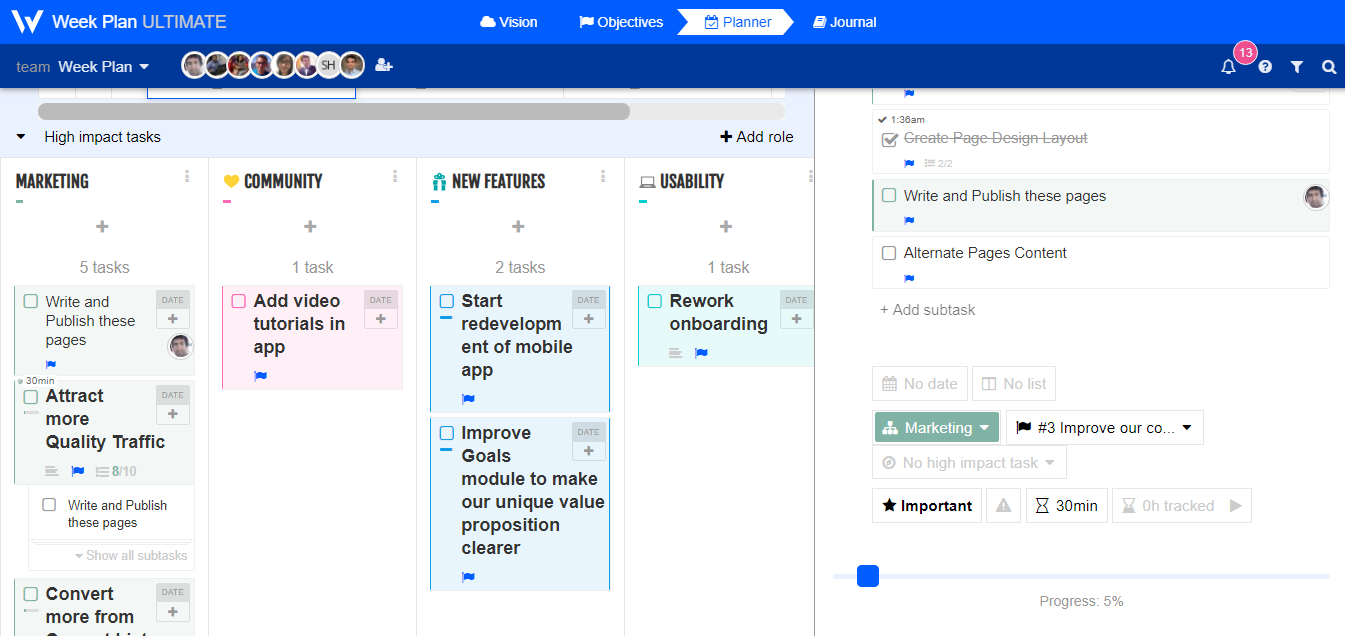
High impact task needs real attention to get them done accurately and quickly. Adding estimates and time spent to these tasks helps you see how much time you planned for important work and how much it actually took.
Pomodoro Timer

Pomodoro Timer is a proven technique to help you stay focused on your tasks for a short period of time. Week Plan's built-in timer runs 25 minutes of focus and 5 minutes of rest, and saves the time you work to the task automatically.
Why add time to your tasks in Week Plan?
Plan more realistic days
When tasks have estimates, you can see whether a day is already full before you add more. Rather than keeping tasks open-ended, you give each one a realistic amount of time.
Learn how long things really take
Comparing the time you estimated with the time you spent shows where your plans are too optimistic, so your next estimates get better.
See where your time goes
On the paid plan, Reports compare estimated and recorded time, including per team member, so you can see how the week was really spent.
Spot tasks that take longer than planned
When the time spent on a task grows well past its estimate, it is a sign to break it into smaller steps or rethink the plan.