Pomodoro Timer Built Into Your Planner
Published: November 16, 2026
💡 Does Week Plan have a Pomodoro timer?
Yes. You can start a Pomodoro timer directly on a task in Week Plan. It guides you through focus sessions and breaks, and the time you spend working is recorded on the task, so your plan and your time tracking stay in one place.
You planned the task. You blocked the time. Then you opened your laptop and twenty minutes went to messages, a quick check of something else, and a tab you don't remember opening. Planning tells you what to do; it does not help much with the moment of actually doing it.
The Pomodoro Technique helps with that moment: work on one thing for a short, timed session, then take a real break. Week Plan has a Pomodoro timer built into your tasks, so you can go from your plan to focused work in one click, and the time you spend is saved on the task for you.
How the Pomodoro timer works in Week Plan
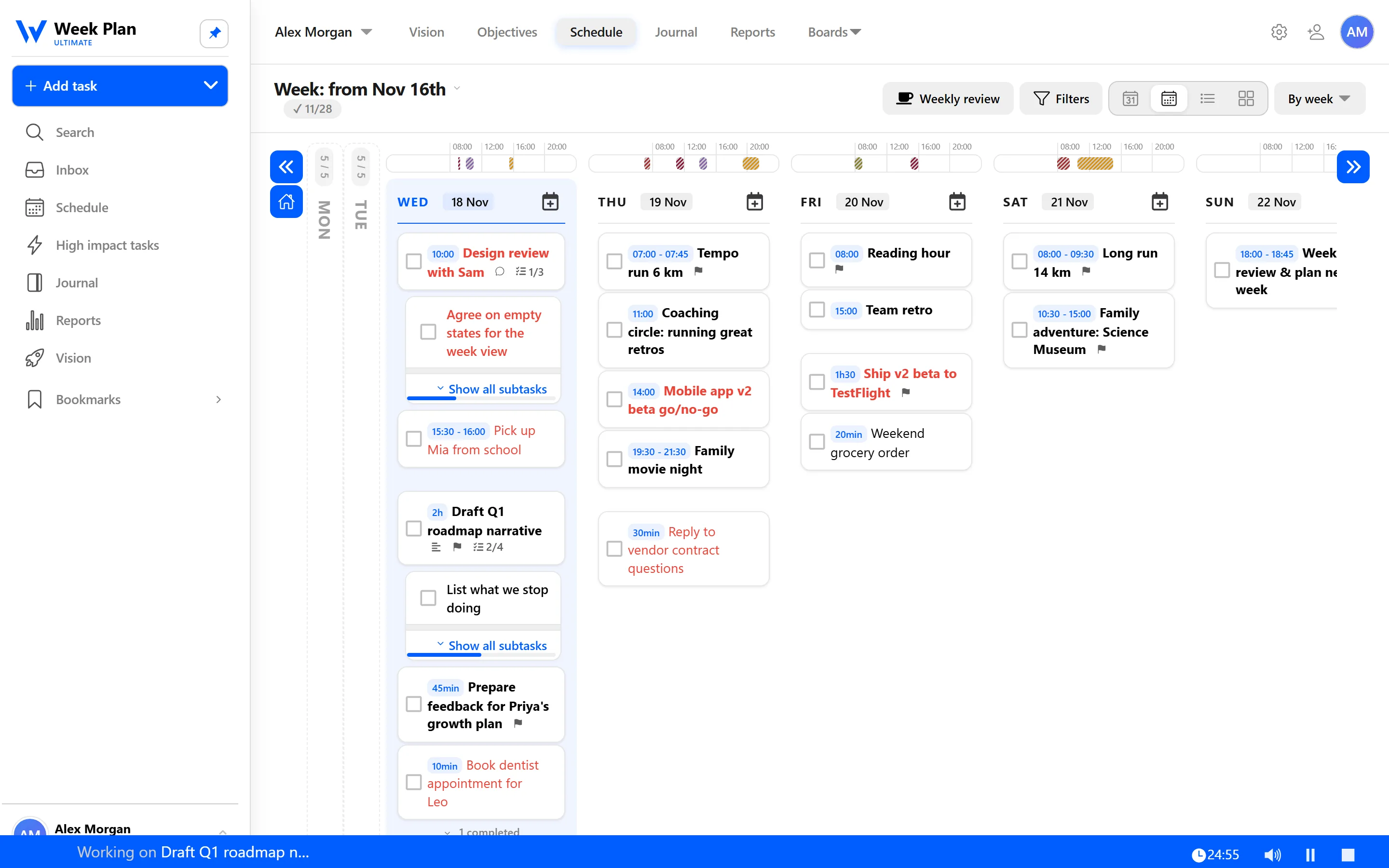
The timer lives where your work already is: on the task.
- Pick the task. Choose something from today, ideally one of your High Impact Tasks.
- Start the timer on it. The timer shows "Working on" with the task, so you know exactly what this session is for.
- Focus until the session ends. One task, nothing else.
- Have a break. When the session is over, the timer tells you to "Have a break". Step away from the screen.
- Repeat. Start the next focus session when you are ready.
Your time is recorded on the task. You don't log anything by hand. The time you spent appears in the task details next to your time estimate, and it counts in your Reports, where you can compare estimated and tracked hours.
Because a Week Plan task can hold subtasks, a long piece of work can be split into steps, and each focus session can tackle the next one.
A typical morning might look like this. You open today's plan and see "Draft the Q3 roadmap", one of your High Impact Tasks, estimated at two hours. You start the timer on it. The first session goes into an outline, the second into the first section, with a short break between them. By lunch, the task shows the time you actually spent, and you know whether your estimate was close. Nothing to log, nothing to remember, and the most important task of the day got your best hours.
Why a timer inside your planner helps
A standalone timer app counts minutes, but it does not know what those minutes were for. Inside Week Plan, every session is attached to a task you already decided was worth doing. That keeps you honest about priorities, and it turns your focus sessions into data you can review later, by role and by quadrant.
The 7 Habits behind it
Week Plan is built on Stephen Covey's The 7 Habits of Highly Effective People. The Pomodoro timer is a small tool, but it touches two of the habits lightly.
Habit 3: Put First Things First. Covey's weekly planning puts important tasks on your schedule first. A focus session is how a planned Quadrant 2 task actually gets done, instead of being nudged aside by whatever is loudest.
Habit 7: Sharpen the Saw. Covey describes renewal as the habit that keeps the others sustainable. On a single day, that renewal is as simple as a break taken on time. Stopping before you are drained keeps your attention fresh for the next session.
How to get started
- Plan your day in Week Plan and choose the one task that matters most.
- Add a time estimate to it, so you can compare it with the time you actually spend.
- Open the task and start the timer.
- Work until the session ends, then take the break the timer suggests.
- At the end of the week, check your Reports to see where your focused time went.
Tips
- Start with your High Impact Tasks. Focus sessions are most valuable on important work that has no deadline pushing it.
- Use the first session to break the task down. If you can't start, spend one session writing subtasks.
- Really take the break. Stand up, drink water, look away from the screen. Switching to your inbox is not a break.
- Keep a short note of distractions. If something pops into your head, drop it into the Inbox and get back to the task.
Who it is for
The timer suits anyone who plans well but struggles to start, people who work in long stretches and burn out by mid-afternoon, and anyone who wants time tracking without remembering to log hours.