Planner with a Built-in Journal
Published: November 16, 2026
💡 Is there a planner app with a built-in journal?
Yes. Week Plan has a Journal next to your weekly plan. You write dated entries, keep them personal or share them in a team workspace, and filter by type or by person, so reflection sits in the same place as planning.
You plan the week, the week happens, and then you plan the next one. What gets lost is the part in between: what you noticed, what you learned, what you would do differently. Those thoughts usually end up nowhere, or in a notebook you don't have with you when you plan. Week Plan keeps a Journal right next to your weekly plan, so your reflections live in the same place as your tasks, and you can share them with your team when that helps.
How the Journal works in Week Plan
The Journal is a stream of dated entries inside your workspace.
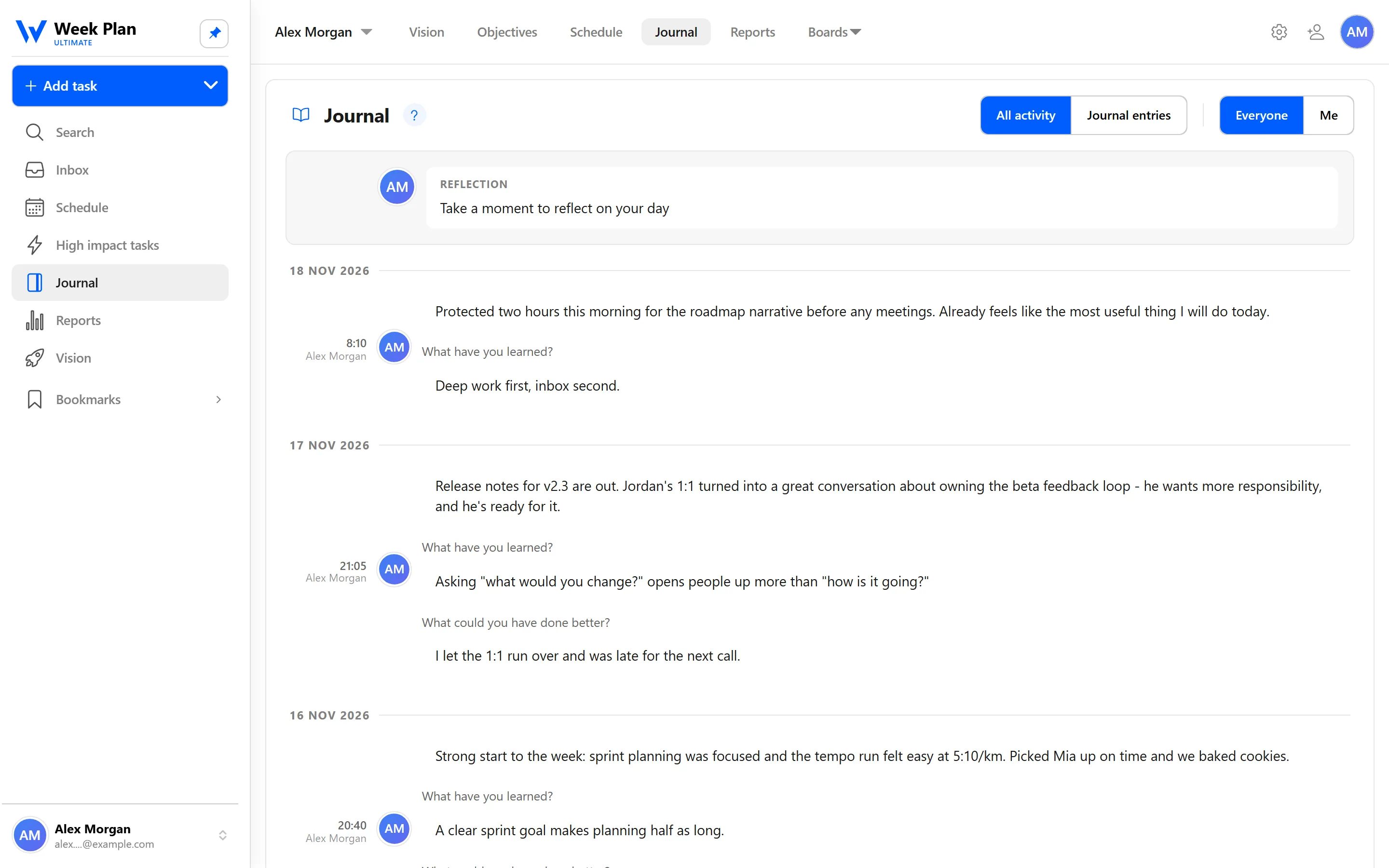
- Dated entries. Each entry is tied to a date, so you can read your journal back as a timeline of your weeks.
- Personal or shared. In your own workspace, the Journal is yours. In a team workspace, entries can be shared with the team.
- Filters by type and by person. Narrow the list down to one kind of entry, or to one person. "Just me" shows only your own entries.
- "New entries" marker. In a shared journal, a marker shows what was added since you last looked, so you can catch up quickly.
Microjournal: a reflection in two questions
When a blank page feels like too much, switch the entry to a microjournal (Cogitorama). Instead of free text it asks two short questions — What have you learned? and What could you have done better? — and lets you add a few words that capture the day, marked as positive or negative. It takes a minute, and over weeks it adds up to an honest record of what works for you.
Why it sits next to your plan
A journal kept in a separate notebook or app tends to be read rarely, if at all. When it lives beside your week, it is there at the moments that matter: when you plan on Sunday, when you go through the Weekly review, when a week went sideways and you want to understand why. Reading back a month of entries often shows patterns no single week reveals, like the same kind of task always slipping, or the same day always feeling overloaded. That is the kind of insight that changes how you plan the next week.
A team journal
In a team workspace, the Journal becomes a shared record. Team members can post updates, decisions or reflections, and everyone can read back through them. It is a calm alternative to piling everything into chat, where things scroll away. With filters by person you can see one colleague's entries, and with "Just me" you can go back to your own.
The 7 Habits behind it
Week Plan is built on Stephen Covey's The 7 Habits of Highly Effective People. Journaling belongs to Habit 7: Sharpen the Saw.
Covey described this habit as regular renewal across four sides of life: physical, mental, social and emotional, and spiritual. Writing is one of the simplest ways to renew the mental side. It slows you down, helps you notice patterns, and turns a busy week into something you can learn from.
It also supports self-awareness, which runs through the whole book. When you can read back what you thought and felt about past weeks, it becomes easier to see whether your plans match the person you described in your Vision.
The academy covers methods, prompts and research in journaling and how to start journaling.
How to get started
- Open the Journal in your workspace.
- Write a first dated entry: a few lines about this week, what went well and what didn't.
- Pick a rhythm, such as a short note at the end of each day or an entry at the end of each week.
- Read back your recent entries before you plan or do your Weekly review.
- In a team workspace, share an entry and use the filters to follow your colleagues' updates.
Tips
- Short beats perfect. Three honest lines are more useful than a page you never write.
- Pair it with the Weekly review. Writing a short entry right after your review captures what the numbers in Reports can't.
- Use the filters. When a shared journal gets busy, filter by person or switch to "Just me."
Who it is for
- Individuals who want their reflections in the same place as their plan.
- Teams who want a shared, dated record of updates and decisions next to their tasks and Objectives.