Personal Vision & Mission Statement Planner
Published: November 16, 2026
💡 How do I write a personal vision and mission statement?
Start with who you are, write a short mission statement about what you want your life to stand for, name your core values, and describe what success looks like in each of your roles. Week Plan's Vision wizard guides you through those steps and keeps the result next to your weekly plan.
Most people have a rough sense of what they want from life, but it rarely makes it onto paper, and almost never into the place where they decide what to do on Tuesday. So the week fills up with what is in front of you, and the bigger picture stays vague. Week Plan's Vision gives that picture a home in your planner: a guided wizard helps you write it, and it stays in the same app as the week you plan around it.
How Vision works in Week Plan
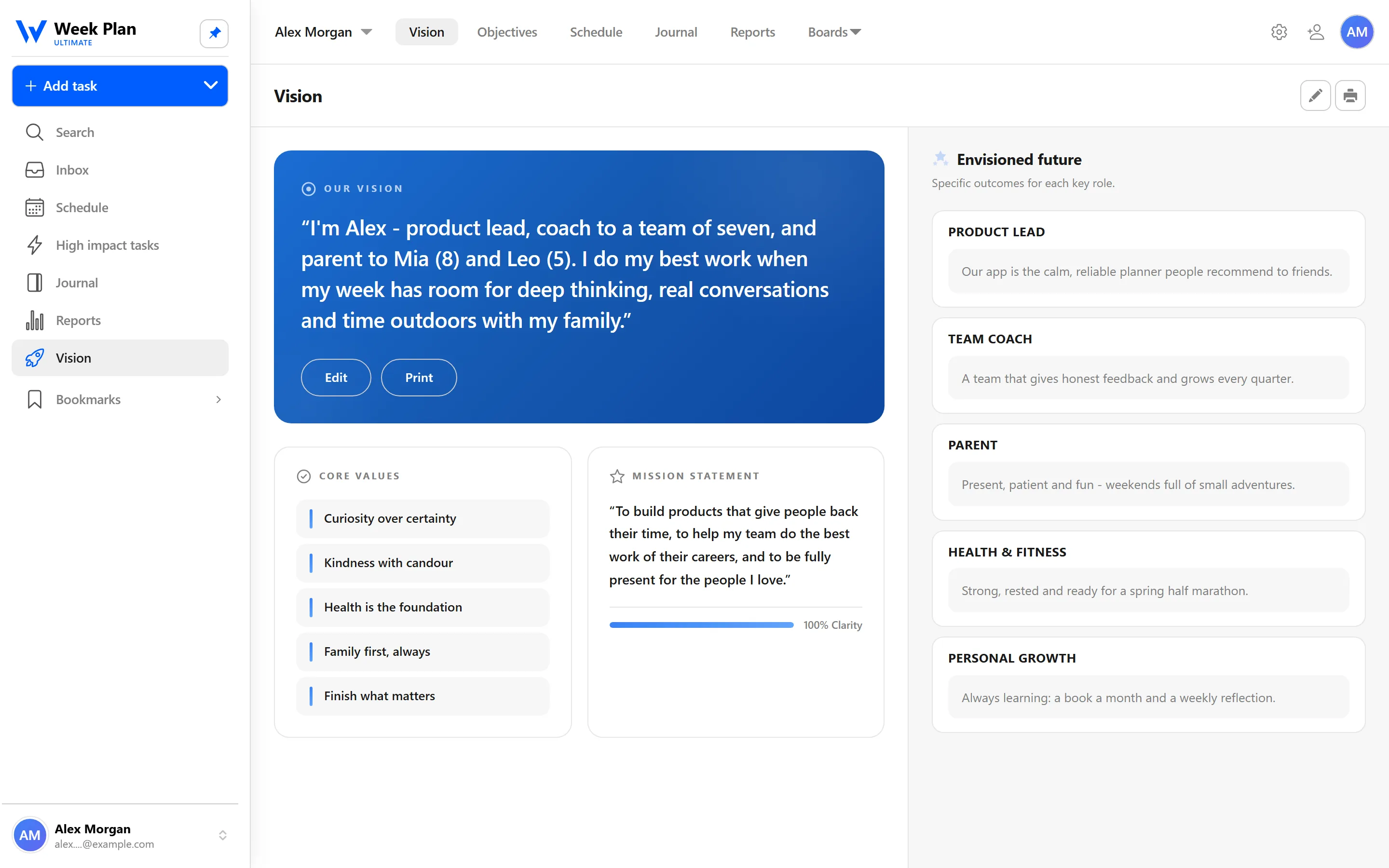
Vision starts with a guided Vision wizard that helps you put four things into words.
- Who I am. A short description of yourself, as a starting point.
- Mission statement. What you want your life to stand for and contribute.
- Core values. The principles you want to guide your decisions.
- Envisioned future for each role. For every role you play, such as professional, parent or health, a picture of what success looks like.
When you finish, Week Plan shows an editable summary. Your vision is not locked in; you can come back and rewrite any part as your thinking changes.
Where your vision meets your week
Vision is not a separate journal you write once and forget. It connects to the rest of the app through your roles:
- Each role carries its envisioned future.
- Each week, you choose High Impact Tasks for each role, with that future in mind.
- Bigger steps can become quarterly Objectives with key results.
That gives you a straight line from "who I want to be" to "what I will do this week."
The 7 Habits behind it
Week Plan is built on Stephen Covey's The 7 Habits of Highly Effective People, and Vision is Habit 2: Begin with the End in Mind.
Covey's central suggestion for this habit is a personal mission statement: a written statement of what you want to be and do, based on the principles you value. He also encouraged looking at life through your roles and asking what you want to have contributed in each. The Vision wizard covers the same ground: mission, values and roles.
His other image for this habit is that things are created twice, first in the mind and then in reality. Vision is the first creation. Your weekly plan is where the second one happens, which is why the two belong in the same app.
The academy goes deeper into the thinking behind each part: vision, mission statements, core values and the envisioned future.
How to get started
- Open Vision and start the Vision wizard.
- Write a first draft of who you are and your mission statement. A few sentences each is enough.
- Pick a handful of core values that you want your decisions to reflect.
- Write an envisioned future for each of your roles.
- Plan your week and choose High Impact Tasks for each role with your vision in view.
Tips
- Draft fast, edit later. The summary is editable, so a rough first version is the right first step.
- Write in your own words. A mission statement that sounds like a company slogan won't guide much. Write it the way you would say it.
- Reread it when you plan. A quick look at your vision before choosing High Impact Tasks is often enough to change one or two of them.
Who it is for
- People at a turning point. A new job, a new child or a big birthday is a natural moment to write down what you want the next chapter to look like.
- Busy professionals who feel stretched. When everything seems urgent, a written mission and values give you a way to choose between good options, not just bad and good ones.
- Anyone who already plans by roles. If you use roles and High Impact Tasks, an envisioned future for each role makes choosing those tasks quicker and clearer.