Boards and Backlog for Your Weekly Planner
Published: November 16, 2026
💡 Where do I keep tasks that don't belong in this week?
In Week Plan you keep them on Boards: lists of cards such as a backlog or an ideas list, plus Parking lot lists and an Inbox for quick capture. When a task's time comes, you drag it from the board into a day of your week.
Your week fills up with more than this week's work. Ideas for next quarter, a book someone recommended, the "we should really fix that" from a meeting, a task you are not ready to start. If all of that lands on your calendar days, your week becomes a guilty list of things you will never do on Tuesday. If you write it nowhere, you lose it.
Boards in Week Plan give those tasks a home outside your week. You capture them, sort them into lists, and pull them into a specific day only when you are ready to commit. Your week stays a plan, and your backlog stays a backlog.
How Boards work in Week Plan
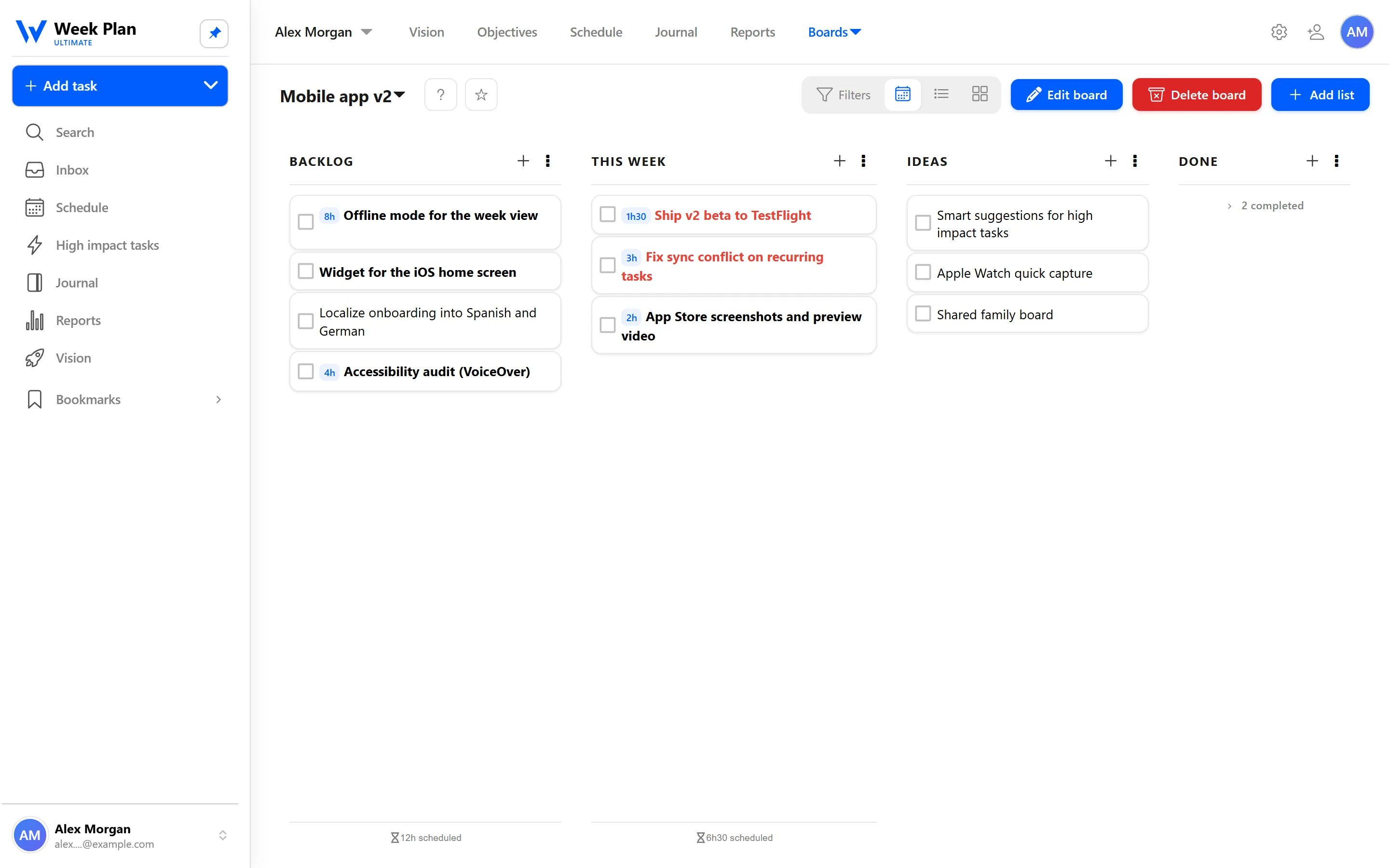
A board is a set of lists, and each list holds cards, which are ordinary Week Plan tasks. A few ways to use them:
- Backlog. Everything you will need to do at some point, for one project or one area of your life.
- Ideas. Things worth keeping that are not commitments yet.
- Parking lot. Parking lot lists hold tasks you want to set aside without scheduling. Park it, and it stops cluttering the week.
- Inbox. The Inbox is for quick capture. When something comes up, put it in the Inbox and decide later where it belongs.
When a task is ready, drag and drop it from the board into your week, onto the day you want to do it. It becomes part of your plan, with everything a task has: subtasks, a time estimate, a role, an objective.
Two tools keep a growing backlog manageable:
- Search finds any task, wherever it lives.
- Bookmarks keep the boards and items you return to often close at hand.
Here is how that looks in practice. Alex, a product lead, keeps a board for the product with a Backlog list and an Ideas list. A customer request that comes up on Monday goes straight into the Inbox. On Friday, during planning, Alex moves it to the Backlog. Two weeks later, when there is room, Alex drags it onto Wednesday, and only then does it become part of the week. At no point did it sit on a day as a task Alex had no intention of doing that day.
You can also send tasks to Week Plan by email; the email integration page explains the format.
The 7 Habits behind it
Week Plan is built on Stephen Covey's The 7 Habits of Highly Effective People, and Boards support Habit 3: Put First Things First.
Putting first things first is as much about what you do not schedule as what you do. When everything sits in this week, the loud tasks crowd out the important ones. A board lets you say "not now" without saying "never". You decide later, on purpose, during planning, instead of reacting to whatever is in front of you.
That decision point is the weekly plan. When you sit down to plan, you look at your roles and High Impact Tasks first, then you open your boards and pull in only what fits. The rest waits, safely, until next week.
How to get started
- Capture anything that comes up in the Inbox, without sorting it yet.
- Create a board for a project or an area of your life, and add lists such as Backlog and Ideas.
- Once a week, empty the Inbox: move each item to a board list, a Parking lot list, or straight into a day.
- While planning your week, drag the tasks you commit to from your board onto specific days.
- Bookmark the boards you check most often so they are one click away.
Tips
- Keep boards out of your week until you plan. The value of a backlog is that it does not compete with today.
- Name lists by decision, not by topic. "Next", "Later" and "Ideas" make planning faster than ten topic lists.
- Review the Parking lot regularly. If something has been parked for months, either schedule a first step or delete it.
- Pull fewer cards than you think. A week with room to breathe is more likely to get done.
Who it is for
Boards suit anyone with more ideas than days: product people with a backlog, freelancers juggling client requests, parents holding a family to-do list, or anyone who wants a weekly planner that stays focused on the week.