
Free Productivity Planner — Plan Around What Matters
Being productive isn't doing more, it's doing what counts. Week Plan ranks tasks by impact with the Eisenhower matrix. Free to start.
Most productivity tools help you do more things. Week Plan is built on the opposite bet: that almost none of what fills your day deserves to be there, and the useful skill is deciding what does.
That idea comes from Stephen Covey. Sort what's in front of you by urgency and importance, and the trap becomes obvious — urgent-but-unimportant work feels like progress and isn't. Week Plan puts that sort into your week: your tasks land in an Eisenhower matrix, your high-impact ones sit on top, and the rest waits its turn.
The rhythm is weekly, not daily. You pick a handful of things that matter, plan the week around them, and on Friday you see what actually happened versus what you intended. That gap is the point — it's what tells you whether you're busy or effective.
Free to start, on web, iOS, Android, Mac and Windows.
Boost Your Performance With Week Plan's Productivity Planner
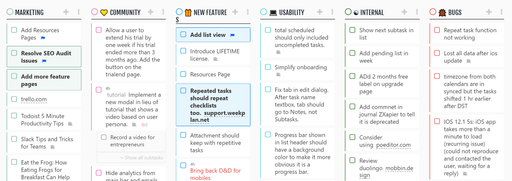
WeekPlan is a productivity planner app meticulously designed to help you capture, organize, clarify, reflect, and engage with intent wherever life happens.
Features of Our Productivity Planner App
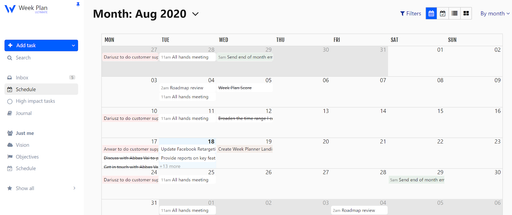
WeekPlan is a productivity planner that helps you and your team become more effective and productive. Inspired by the seven habits of highly effective people and the OKR (Objective Key Results) framework, WeekPlan enables you to prioritize your goals and objectives, key results you plan on achieving, and high-priority tasks that will lead you there. WeekPlan also helps users track projects effectively, emphasizing its project management capabilities.
Prioritization
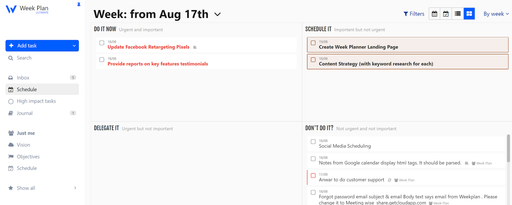
WeekPlan is all about getting the right things done. It helps you find clarity for the day while keeping an eye on the future. It brings your next plan of action into focus so that you can differentiate between what’s urgent and what’s important. Rather than focusing on completing all the tasks and being productive, it acts as a focus planner, helping you concentrate on essential tasks.
Setup Objectives and Key Results
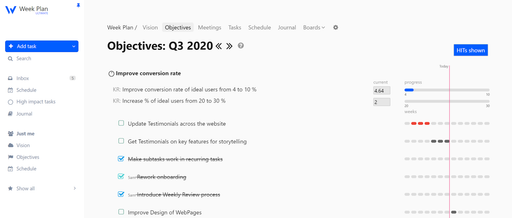
WeekPlan helps you filter out actions you can complete in a specific period and resources available at your disposal. WeekPlan can also function as a quarterly planner, helping users break down big objectives into manageable 90-day chunks. The OKR management strategy ensures that your entire organization is on the same page. It helps your employees’ work, cooperate, and move in unison. The productivity planner helps in the constant reassessment of your corporate goals to be met, helps in taking care of issues arising, and provides your teams with a chance to recalibrate their working styles & communications.
High Impact Daily Tasks
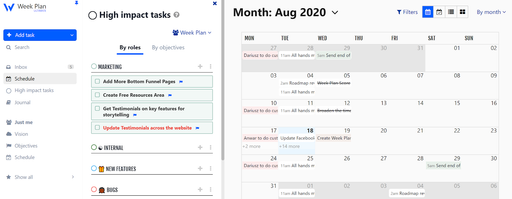
High Impact Tasks are ones that contribute significantly toward your long-term goals. HITs are a list of tasks that are deliberately accomplished in a specific time period (week, month). HITs are like the core of the WeekPlan. It is an ideal way to keep an eye on your top priority tasks so that you don't miss any of them.
Time Tracking to Track Projects
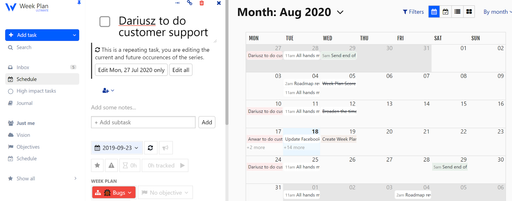
Whether you are a lone ranger or working in teams, keeping an eye on the time spent completing a task is something you can’t ignore. WeekPlan provides you with a comprehensive view of the time taken to complete a task and all the subtasks related to it. You can set a timer for tasks, goals, and even projects you and your team are working on.
WeekPlan integrates seamlessly with Google Calendar, allowing users to organize and schedule events efficiently.
Benefits of Using Our Productivity Planner App
If you are on the lookout for a productivity planner that can help you stay organized yet productive, then WeekPlan is your answer. Our productivity planner app enables you to stay on top of your busy schedule without missing a beat. The productivity planner gives you a glance at your entire week, allowing you to plan your time more optimally and efficiently. WeekPlan can also be used as a full focus planner, helping users break down their goals into manageable 90-day increments.
Time Management
The first and foremost benefit that you’ll reap from our productivity planner is scheduling time effectively. Using WeekPlan as your daily planner helps you manage your daily tasks effectively, ensuring you never run out of time to complete tasks on your plate. We help you focus and organize, so you don’t hop from one thing to another, without really thinking about everything as a whole. Using our productivity planner app, you will be able to schedule appointments, events, assign deadlines to tasks and goals, so that you have a clear idea about what to expect and never run out of time.
Improved Productivity
Our productivity planner app helps you attain greater results in a lesser amount of time. It is integrated with the Pomodoro Technique, empowering you to focus your mental energy on the most meaningful tasks ahead. So, you can take advantage of every moment of every day and swiftly cross your tasks effectively and efficiently.
Lower Stress Levels
Keep in mind that stress will only overwhelm you. You get stressed by your hectic schedule, too many demands, or too much on your plate. Our productivity planner will help you lower your stress levels. It will help you allocate time for everything, breeze through responsibilities seamlessly without worrying about missing anything, getting late, or having to back out at the last moment.
More Time for Creativity
WeekPlan helps you discover your untapped creative side. When you have planned out your mandatory responsibilities (both work and personal), you have ample time for your creative endeavors. You get to try and experiment with new things.
Easy Integrations
WeekPlan offers diverse integration options in more than a thousand ways with dozens of other apps. You can connect WeekPlan with any of the apps you use for other purposes in your team to make task management simpler for you.
Types of Productivity Planners
There are several types of productivity planners available, each offering unique features and benefits tailored to different needs. Here are some of the most common types of productivity planners:
Daily Task Management
Daily task management planners are designed to help you prioritize and manage your daily tasks effectively. These planners typically include a to-do list, a detailed schedule, and space for notes and meeting notes. They are perfect for individuals who need to stay on top of their daily tasks and appointments, ensuring that no important tasks are overlooked. By focusing on daily planning, these planners help you maintain a clear and organized approach to your day-to-day responsibilities.
Weekly Planning
Weekly planners are ideal for those who prefer to organize their tasks and goals on a weekly basis. These planners usually feature a weekly calendar, space for setting weekly goals, and a comprehensive to-do list. They allow you to plan and prioritize your tasks for the entire week, providing a broader perspective on your schedule and helping you stay on track with your weekly goals. By using a weekly planner, you can ensure that you allocate sufficient time for both work tasks and personal activities, leading to a more balanced and productive week.
Built to Help You Get Things Done
WeekPlan is a web-based productivity app trusted by thousands and often listed among the best productivity apps and best planner apps for individuals and teams. Designed as a powerful daily planning app and day planner app, it helps you manage time effectively, organize work, and maintain a healthy work life balance. With an intuitive interface and clean user interface, WeekPlan offers a low learning curve, making it an efficient app for both beginners and experienced planners.
Unlike many to do list app options or isolated note taking app tools, WeekPlan brings together all the features you need in one place. You can manage tasks, notes, and schedules alongside other tools you already use, including Google Tasks, Notion Calendar, and Google Workspace. It supports unlimited calendars, a flexible calendar view, and rich task details to help you track progress clearly. Even the free version includes robust functionality, making it a standout among best productivity apps.
WeekPlan works seamlessly for Android users and desktop users alike through its web and desktop app, with flexible pricing options including a monthly subscription or yearly subscription.
Roles Management
The productivity planner makes it easier for you to deal with diverse teams. If dealt manually, task assignments based on multiple roles can be challenging. With WeekPlan's role management, you have the luxury to assign different roles to different members of the team and manage tasks in an organized manner.
Task Calendar for Teams
Things you put in your calendar have a much higher chance of getting done. Our productivity planner is equipped with a robust calendar for you to see and track the progress of tasks in a given period. WeekPlan empowers you to manage the whole team's tasks with a few clicks. You can see the tasks assigned to your team across the day, week, month, and even quarter.
Weekly Planner Reviews
Weekly reviews are where planning turns into progress. WeekPlan’s automated review helps teams reflect on completed work, evaluate project status, and adjust priorities before small issues grow. This daily planning app surfaces insights from task details, calendar view, and assigned roles to highlight bottlenecks early.
With built-in support for tracking habits, reviewing outcomes, and adjusting plans, WeekPlan goes beyond basic planning. The combination of advanced features, strong team collaboration, and integrations with Notion Calendar, Google Tasks, and Google Workspace makes it one of the best productivity apps for sustained success—even with a modest learning curve.
Frequently Asked Questions
1. What is a productivity planner?
A productivity planner is the means to organize tasks so that you can focus on what matters most and intelligently plan your day. It helps structure your daily schedule, clarify today’s tasks, and ensure important priorities are addressed first. Modern planners often include note taking features, support for file uploads, and AI powered features that help users plan more efficiently. With the right planner, you can consistently make the most out of every moment.
2. Who can use a productivity planner?
Entrepreneurs, managers, and businesses can use a productivity planner to improve execution across work and personal goals. It’s useful for individuals and teams across major platforms, regardless of role or industry. WeekPlan supports individuals as well as organizations by offering structured planning, shared goals, and a smooth onboarding process that helps new users get started quickly. Whether managing simple tasks or complex workflows, users can rely on tools designed to intelligently plan and adapt as priorities evolve.
3. Why use a productivity planner calendar app?
A productivity planner app goes beyond basic lists by organizing work directly on your calendar. It allows you to plan your week, manage deadlines, and align tasks with real time availability. Advanced planners include integrations with tools like Notion database items, support rich note taking features, and offer AI powered features that suggest better scheduling decisions. Compared to static tools, these apps help teams and individuals stay aligned while managing changing workloads.
4. Does WeekPlan offer a free trial?
Yes, WeekPlan offers a free trial of 7 days, allowing users to explore its planning capabilities before committing. For those looking for long-term value, flexible options such as a lifetime subscription may also be available, depending on current plans.
5. Does WeekPlan offer integrations with other platforms?
WeekPlan has Android, iOS, Chrome, Mac OS, and Windows apps so that you can make the most of the tool. Apart from these standalone integrations, WeekPlan offers customer integrations via Zapier and its API as well.