This guide covers the planning approach that makes it work. Here is how to stop firefighting and start leading!
What this guide covers:
- The reactivity trap - why meetings and urgent requests keep managers stuck in execution
- Weekly vs daily - how a seven-day view changes what you focus on
- Delegation frameworks - using the Eisenhower Matrix to decide what to do, delegate, or drop
- OKRs to weekly actions - connecting quarterly goals to weekly tasks
- The 30-minute review - a single habit that replaces multiple status meetings
Why do most managers spend their weeks reacting instead of leading?
Reactivity feels productive - every answered email gives a small hit of accomplishment. But at the end of the week, strategic work sits untouched. The gap between what managers spend time on and what actually moves the organization forward is where leadership time management breaks down.
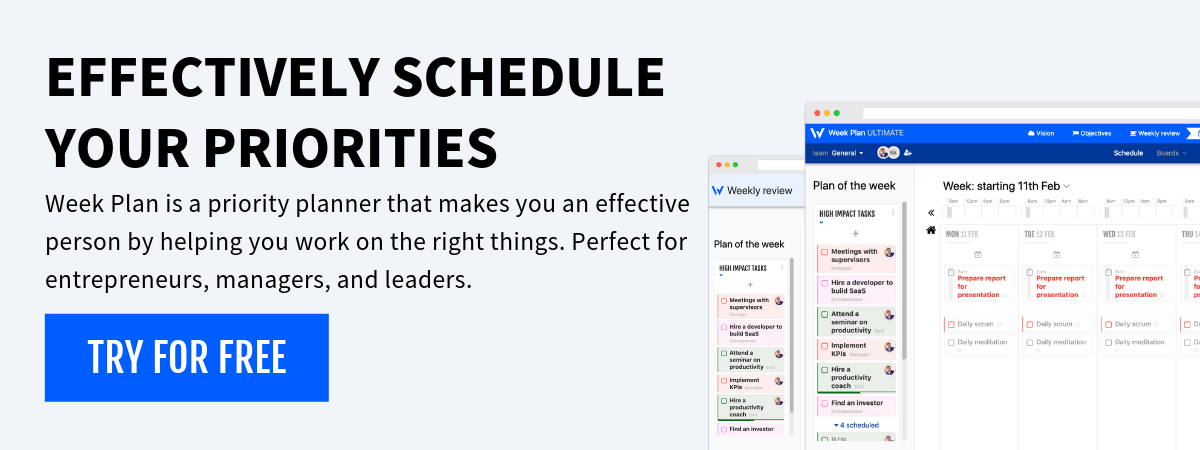
It happened gradually - one more direct report, one more recurring meeting, one more "quick sync" that eats 45 minutes. Without structure protecting strategic time, urgency wins. WeekPlan exists to rebuild that structure around roles, priorities, and the week ahead.
The manager's time trap - meetings, emails, urgent requests
A manager's calendar fills from the outside in. Meetings get booked by others, emails arrive with implied deadlines, and by Wednesday the week looks nothing like Monday's plan. Every hour reacting is an hour not spent on leadership work - a good manager productivity tool prevents this by protecting strategic time before the calendar fills up.
Why daily task management keeps you stuck in execution mode
Daily planning keeps your eyes on the ground. You check what is due, knock items off, and repeat. Managers need a wider lens to spot conflicts and protect deep work. Without the whole week in view, the IT ticket always beats the roadmap review because it takes five minutes.
How weekly planning transforms management
The shift from daily to weekly changes one thing: you stop reacting and start choosing. What are the three to five things that move the needle this week? Decide once on Monday and stop deciding a hundred times a day.
Weekly vs daily - why the shift in perspective matters
A daily planner asks "what do I do today?" A weekly planner asks "what do I accomplish this week, and which days fit each piece?" If a crisis eats Monday, you shift the strategy session to Thursday - the week absorbs disruption a single day cannot.
What top-performing managers do differently with their time
Top performers protect time for non-urgent but important work. They block hours for thinking and one-on-ones - then defend those blocks. An executive weekly planner with built-in features like role-based planning and the Eisenhower Matrix provides that visibility without extra effort.
The Eisenhower Matrix for managers - delegation done right
The Eisenhower Matrix divides tasks into four quadrants by urgency and importance. For managers, it becomes a delegation framework - each quadrant tells you not just what to do, but who should do it. Most managers overload Quadrants 1 and 3, leaving Quadrant 2 empty week after week.
How to decide what to delegate, defer, or do yourself
A practical delegation filter for each quadrant:
| Quadrant | Action | Example |
|---|---|---|
| Q1: Urgent + Important | Do yourself - now | Client escalation, production outage |
| Q2: Not Urgent + Important | Schedule and protect the time | Strategy review, team development, process improvement |
| Q3: Urgent + Not Important | Delegate or automate | Status updates, routine approvals, scheduling |
| Q4: Not Urgent + Not Important | Drop entirely | Legacy reports nobody reads, redundant meetings |
WeekPlan's Eisenhower Matrix makes this sorting physical - drag tasks into quadrants and see where your week is weighted. If Quadrant 3 overflows, you are doing work that belongs to someone else.
OKRs and weekly planning - connecting goals to execution
Quarterly OKRs look great in a slide deck. Translating them into weekly actions is where teams stall. Weekly planning bridges that gap by asking one question every Monday: what moves the Key Results forward in the next seven days?
How to translate quarterly OKRs into weekly actions
Start with the Key Result, not the Objective. If the KR is "reduce churn to under 5%," ask what specific action this week contributes to that number. One concrete task tied to a measurable outcome beats a vague "work on retention."
A strong OKR-to-weekly translation follows these steps:
- Pick 2-3 Key Results - the ones most needing progress this week
- Define one action per KR - specific, completable, clear deliverable
- Assign a day and time block - so the action does not float as a vague intention
- Review in your weekly review - did it happen? Did it move the number?
This rhythm turns quarterly goals into weekly habits. When every task connects to a measurable Key Result, manager task prioritization stops being guesswork.
How to track team progress without micromanaging
Micromanagement usually comes from anxiety - you cannot see what is happening, so you ask. Constant check-ins are a visibility problem, not a trust problem. Team planning software that surfaces progress by role eliminates the guesswork.
The weekly review that replaces five status meetings
Most status meetings exist because nobody has a clear picture of last week. People reconstruct five days from memory, which produces opinions instead of insights. A structured weekly review creates that picture in 30 minutes - a decision-making session based on real data, not a meeting about meetings.
The Think Win-Win principle applies here - a good review balances team capacity with organizational demands. When you treat it as alignment rather than audit, the team contributes openly.
How a 30-minute weekly review works
Block 30 minutes on Friday afternoon or Monday morning. Three phases: look back at what happened, assess what it means, plan forward with adjusted priorities. WeekPlan's weekly review template walks you through every step so nothing gets skipped.
What to review - team progress, blockers, priorities
Start with goal progress - which OKRs moved forward and where gaps appeared. Then check blockers needing your intervention. Run a quick calendar audit to see whether time matched priorities, and finish by naming next week's top three outcomes.
This replaces scattered Slack updates and the Friday email thread asking "where are we on X?" One review, one place, one rhythm.
Remote and hybrid team management through weekly planning
Remote teams lose the hallway conversations that keep in-office management instinctive. Weekly planning fills that gap by making priorities visible regardless of time zone.
The principle of building team synergy matters most here - synergy in a distributed team happens when people see how their work connects. A shared weekly cadence creates that visibility without synchronous overhead.
Common management planning mistakes
Even committed weekly planners undermine themselves with habits that feel productive but prevent progress. These mistakes are common because they look like discipline.
Planning your team's week but not your own
You spend Sunday evening aligning your team's deliverables - then walk into Monday without a plan for yourself. Your team has direction while you have a blank calendar filling with requests. The fix: plan your own week first, then your team's.
Confusing project management with personal planning
Project tools track tasks across teams and timelines. Personal planning focuses on your priorities. Using Jira as your weekly planner means you see the project's needs, not yours - you need both a project view and a personal weekly view for leadership work.
Ignoring the strategic quadrant
Quadrant 2 - important but not urgent - is where strategic work lives: culture, succession plans, process improvements. None have deadlines screaming at you. The fix: schedule Quadrant 2 and protect it like a meeting with your CEO.
How to set up WeekPlan as a management tool
Getting started takes less time than your next status meeting. The Synergize - Habit 6 principle guides the setup - combining roles, the Eisenhower Matrix, and weekly reviews into something greater than the parts.
Configure WeekPlan for management in four steps:
- Define your roles - create 4-6 roles reflecting your responsibilities (team lead, strategist, mentor) and assign weekly actions
- Sort with the matrix - drag tasks into Eisenhower quadrants to separate leadership from reactive work
- Schedule your review - pick a 30-minute recurring slot so the habit builds automatically
The setup takes about 20 minutes because the frameworks are built in. Start with the free plan, run one full weekly cycle, and refine based on what you learn.
The manager who plans weekly leads - the rest just reacts
The difference between leading and keeping up is structure. Weekly planning gives you space to think beyond today's inbox. Roles keep attention balanced, the Eisenhower Matrix makes delegation visible, and a consistent review keeps everything on track.
Frequently asked questions about weekly planning for managers
Can WeekPlan replace project management tools like Asana or Monday?
WeekPlan is a personal and team planning tool, not a project management platform. Use project tools for cross-team workflows and WeekPlan for your own weekly priorities.
How does WeekPlan handle team collaboration?
WeekPlan supports shared workspaces where team members see priorities, assign tasks, and track progress weekly. Managers gain visibility into alignment without replacing existing channels.
Is WeekPlan suitable for C-level executives?
C-level executives benefit from role-based planning and OKR features that connect strategy to weekly actions. The vision planner suits leaders managing multiple business areas.
How much time does weekly planning actually save managers?
Managers who adopt weekly planning typically reclaim several hours per week by cutting redundant meetings and batching tasks. The 30-minute review alone replaces multiple check-ins.
How do I get my team to adopt weekly planning?
Start by modeling the habit yourself - share your weekly priorities openly and reference them in one-on-ones. When the team sees fewer surprises, adoption follows naturally.